





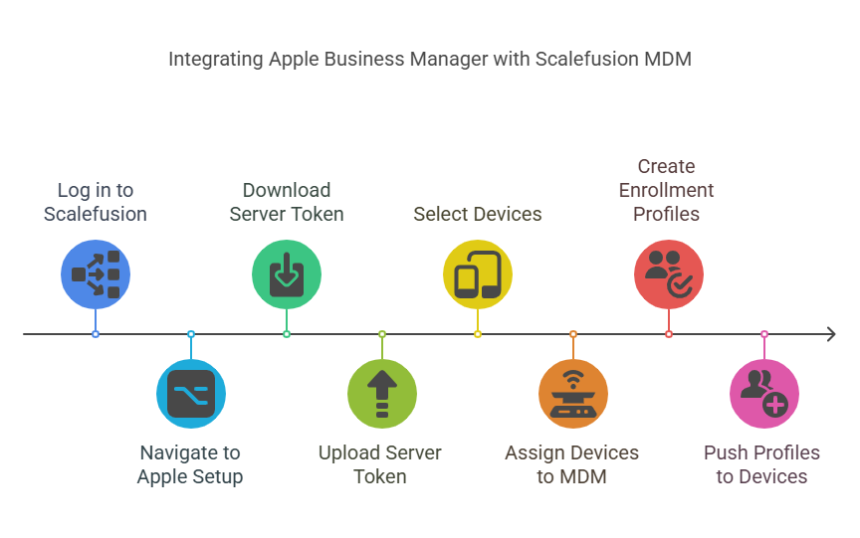
In today’s digital workplace, companies depend heavily on mobile devices, applications, and cloud-based services. Managing hundreds of iPhones, iPads, and Macs manually is no longer realistic—especially when employees expect to receive devices that are ready to use from the moment they open the box. Apple Business Manager (ABM) was created exactly for this purpose. It brings simplicity, automation, and security to organizations that rely on Apple technology.
What Is Apple Business Manager?
Apple Business Manager is Apple’s centralized online platform that allows companies to manage their Apple devices, apps, and user accounts. Instead of configuring each device by hand, IT teams can automate setup, assign devices to MDM systems, and distribute apps with ease.
ABM combines features of Apple’s older programs—Device Enrollment Program (DEP) and Volume Purchase Program (VPP)—into a single dashboard. This makes it easier for organizations of all sizes to manage their Apple ecosystem from one place.
Why Organizations Use Apple Business Manager
1. Zero-Touch Deployment
One of ABM’s biggest strengths is zero-touch deployment. Devices purchased through Apple or authorized resellers can be automatically assigned to the company’s MDM (Mobile Device Management) solution. When an employee turns on their device for the first time, it configures itself without any manual effort.
This means:
-
No more IT pre-setup
-
Faster onboarding
-
Reduced workload for support teams
2. Centralized Control
Companies using multiple Apple devices often struggle with consistency. Apple Business Manager solves this by offering a centralized system where all devices can be:
-
Enrolled
-
Organized
-
Monitored
-
Assigned to users
IT teams maintain full oversight without physically handling the device.
3. Secure and Compliant
Security is a priority for any organization. ABM ensures devices stay compliant with company policies by enforcing:
-
Strong passcodes
-
Encryption
-
Restrictions on specific features
-
Mandatory MDM enrollment
Even if a device is factory reset, it remains tied to the company.
4. Efficient App and Content Distribution
Apple Business Manager includes a powerful system for buying and distributing apps. Companies can purchase App Store apps in bulk and assign them to specific users or devices. When an employee leaves, the license can be reclaimed and reassigned—saving both time and money.
Key Features of Apple Business Manager
Device Management Integration
ABM does not replace MDM—it enhances it. The platform works alongside popular MDM tools like Jamf, Intune, Kandji, and others. IT administrators use ABM to assign devices, while the MDM handles detailed configuration.
Managed Apple IDs
Instead of personal Apple IDs, companies can create Managed Apple IDs for employees. These IDs are controlled by the organization and help keep work data separate from personal data.
Role-Based Access
ABM supports assigning different roles with specific permissions, such as:
-
Administrator
-
Device Manager
-
Content Manager
-
Staff roles for educational institutions
This ensures each team member only has access to what they need.
Support for Multiple Platforms
Apple Business Manager works for:
-
iPhone
-
iPad
-
Mac
-
Apple TV
This makes it ideal for companies that use different types of Apple hardware.
How Apple Business Manager Benefits Different Businesses
Small to Medium Businesses (SMBs)
Small companies get a professional, controlled device setup process without needing a large IT department. Even if a business only uses a handful of devices, ABM provides long-term advantages.
Large Enterprises
Big organizations appreciate ABM’s automation features. With hundreds—or thousands—of devices to manage, automated enrollment and bulk purchasing become essential.
Education Sector
Schools and universities often deploy large numbers of iPads. ABM integrates with Apple School Manager features to support classrooms, shared devices, and student Apple IDs.
Setting Up Apple Business Manager
The setup process is straightforward:
-
Sign up through the Apple Business Manager website.
-
Verify the company domain.
-
Link authorized resellers to automatically add new devices.
-
Connect ABM to your preferred MDM solution.
-
Start assigning devices and apps.
Once this setup is complete, the organization gains full control over all existing and new Apple devices.
Conclusion
Apple Business Manager has become a cornerstone of modern device management. It gives organizations the ability to automate deployment, secure their ecosystem, and control app distribution from a single, easy-to-use platform. Whether you’re a startup with a few employees or a large enterprise managing thousands of devices, ABM delivers the tools needed to simplify your workflow and maintain a secure, scalable device environment.